
Connected notes · 8 minute read
Turn connected research notes into a study guide
Published by Weavernote · Send a correction
Published October 5, 2026
Start with three focused source notes, connect the ideas, choose exactly which notes AI Studio should use, and check the result before studying it. This walkthrough uses research-method notes to show the whole process.
What you will make
You will build a small collection about interviews, surveys, and observation; a comparison you can check against those notes; and questions for practicing the distinctions. You can follow the same steps with course readings or research material you are allowed to process.
The note bodies, prompts, comparison, and question answers below are written for this guide. They are copyable editorial examples, not a published research study, captured AI responses, or guaranteed outputs. The product image shows the existing graph interface, not this sample workspace.
1. Keep one source or idea per note
Create a notebook for this topic, such as Research methods — review. Create these three notes and paste the corresponding text into each. For your own research, also record the original source, author, date, and relevant page or section so you can check it later.
Interviews — depth and interpretation
Interviews let a researcher ask follow-up questions and explore a participant’s explanation in depth. What a participant says is a report of their experience, not direct observation of every behavior. Keep quotations separate from your interpretation.
Surveys — consistent questions
Surveys ask participants a consistent set of questions. Responses can help compare answers across respondents, but wording and who responds affect what the results represent. A survey answer is not proof that the reported behavior occurred.
Observation — behavior and context
Observation records what happens in a particular setting. Record the setting and observed behavior separately from possible explanations. Seeing someone leave a study room does not establish why they left; a follow-up interview may help explore that question.
Keep evidence and interpretation separate. A short note with a clear boundary is easier to check than a large document that mixes quotations, guesses, and conclusions without labels.
2. Connect the notes for a reason
Use a note reference or the connection manager to connect Interviews with Observation: an interview can explore an explanation that observation alone does not establish. Connect Interviews with Surveys to compare follow-up questions with consistent questions.
Add a sentence in the note explaining why each relationship matters. A link marks a connection; the explanation makes it useful when you return to the material.
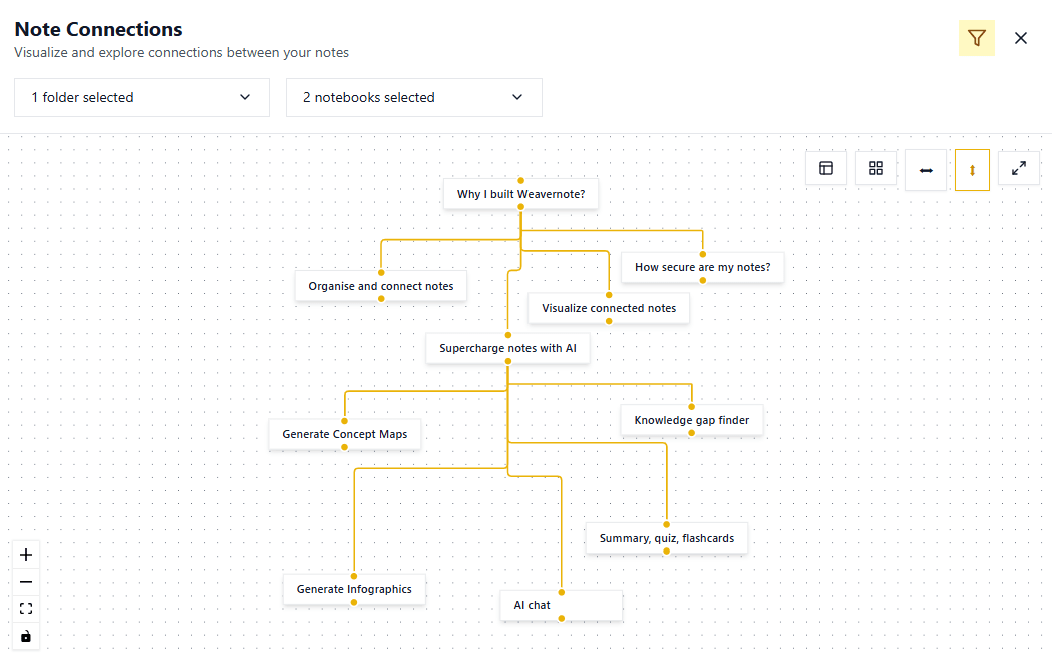
Open the knowledge graph to explore your connected notes. This differs from an AI-generated concept map: the graph represents workspace links, while a concept map is generated from selected content.
3. Select the AI context explicitly
Open AI Studio and select the three notes, or their notebook if it contains only this topic. Then choose Interactive Chat. Note links help you navigate; they are not a promise that chat will automatically read every connected note. Check the selection before starting.
A folder or notebook may include extra material. For this first pass, select just these three notes so the comparison remains easy to verify. Selected readable material is sent for server/provider AI processing; see Privacy before using confidential source material.
A prompt to try
Using the selected notes, compare interviews, surveys, and observation. For each method, list what the notes say it can help reveal and one limitation. Name the source note for each row. If a detail is absent, say it is not stated. Do not invent findings or participant counts.
Asking for source-note names helps you review a response; it does not guarantee accurate citations or prevent unsupported claims. The current chat experience does not promise a citation for every statement.
4. Check the comparison against the source
Use this editorial reference to check the core distinctions. Your generated response may have a different format or need correction.
| Source note | What it helps reveal | Boundary to keep |
|---|---|---|
| Interviews | A participant’s explanation, with follow-up questions | Reported experience is not direct observation of every behavior |
| Surveys | Answers to consistent questions across respondents | Wording and respondents affect representation; reports are not proof of behavior |
| Observation | Behavior in a particular setting | Observed behavior alone does not establish a person’s reason |
Open each named note and check the claim. Remove details that the sample does not supply: sample size, a “best” method, statistical results, and claims about why someone acted. If the answer merges observation with interpretation, ask a follow-up:
Separate what the Observation note directly states from possible explanations. Which claims cannot be established from the selected notes?
If something is still unsupported, correct your own comparison or improve the source notes. Asking again does not make an answer true. Save a checked version as a separate review note, keeping the originals available.
5. Generate questions from the checked material
Return to AI Studio. Select your checked review note and any original notes needed for context, then choose Combined Flashcards or Knowledge Quiz. Start with one distinction per question so you can tell what needs more review.
Editorial question-and-answer examples
- Question: Which method in the notes supports follow-up questions? Answer: Interviews.
- Question: Does watching someone leave a room establish their reason? Answer: No. Observation records behavior and setting; the explanation remains separate.
- Question: What two factors does the Survey note say affect representation? Answer: Question wording and who responds.
Check every generated answer against its source. Reject a question such as “Which method is always most accurate?” because these notes do not establish that. Review generated options too: a quiz can have an ambiguous question or an incorrect answer.
Try answering before revealing a flashcard or checking a quiz result. Return to the original note when you miss a distinction; revise the source and generate a fresh set if the question itself is unclear.
When the workflow needs adjustment
- The answer mixes unrelated topics: narrow the selected notes rather than assuming a graph connection controls context.
- Two sources disagree: preserve each source and its date. Ask for the disagreement, then decide using the original evidence.
- The answer invents a source: check it manually. Source names in a response are review aids, not proof.
- The output omits a limitation: add the limitation to the checked review note before generating study questions.
- A tool is unavailable: check the current plans and limits. AI processing needs network access; this guide does not imply unlimited use.
Before you call it a study guide
- Can you trace each comparison and answer back to a source note?
- Have you separated direct evidence from interpretation?
- Did you preserve uncertainty, conflicting sources, and missing information?
- Are the generated questions answerable from your selected material?
- Can you return to the original sources without relying on the AI answer?
For capturing new material first, follow the lecture-to-study guide. For the product controls, see AI note-taking, flashcards, and the student workflow.